

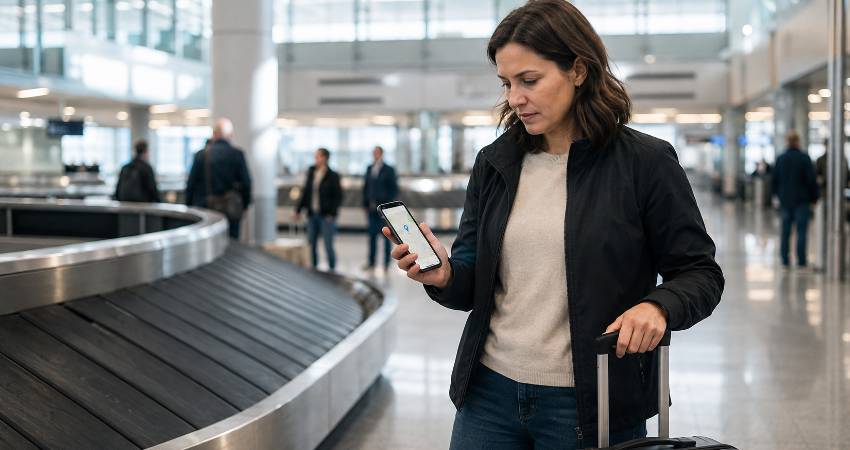
A luggage tracker can turn a stressful airport mystery into a much simpler question: “Where is my suitcase?” But there is a catch that many buying guides gloss over. Most popular luggage trackers are not GPS devices at all, and choosing the wrong one for your phone can seriously limit how useful it is.
The best luggage tracker is usually the one that works with the tracking network your phone already uses. For most travellers, that means a Bluetooth tracker such as an AirTag, SmartTag2 or Google Find Hub-compatible device. Cellular GPS trackers have their place too, but they are larger, more expensive and often involve an ongoing subscription. That distinction between the network and the hardware is the part most people get wrong, and it is worth understanding properly before you spend anything — the tracker guides at Tracqueur break down how each finding network actually behaves in the real world.
Here is how to choose the right tracker for your suitcase, whether you are checking a bag from Heathrow, changing flights in Europe or travelling somewhere with patchier mobile coverage.
The Best Luggage Trackers at a Glance
| Tracker | Best for | Network | Subscription | Key advantage |
|---|---|---|---|---|
| Apple AirTag (2nd generation) | iPhone users | Apple Find My | No | Excellent ecosystem integration |
| Samsung Galaxy SmartTag2 | Samsung Galaxy users | SmartThings Find | No | Long battery life and strong features |
| Motorola Moto Tag 2 | Non-Samsung Android | Google Find Hub | No | Designed for Google’s tracking ecosystem |
| Pebblebee Clip/Card | Mixed iPhone and Android households | Apple Find My or Google Find Hub | No | Can switch between ecosystems |
| Tile | Existing Tile/Life360 users | Tile network | Optional | Works across iPhone and Android |
| Cellular GPS tracker | Remote and specialised tracking | GPS + mobile network | Usually | More frequent location updates |
Which Luggage Tracker Is Best for You?
If you use an iPhone
The Apple AirTag is the obvious starting point. It works with Apple’s Find My network and integrates directly into the iPhone experience, so there is little additional setup or learning involved.
The second-generation AirTag, which arrived in January 2026, retains the familiar compact design while adding a longer finding range, a louder speaker and improved Precision Finding — the latter now extending to recent Apple Watch models, which is genuinely handy when your hands are full of boarding passes and coffee. It is also rated IP67 for water and dust resistance, making it well suited to the occasional rain-soaked suitcase or damp airport baggage area.
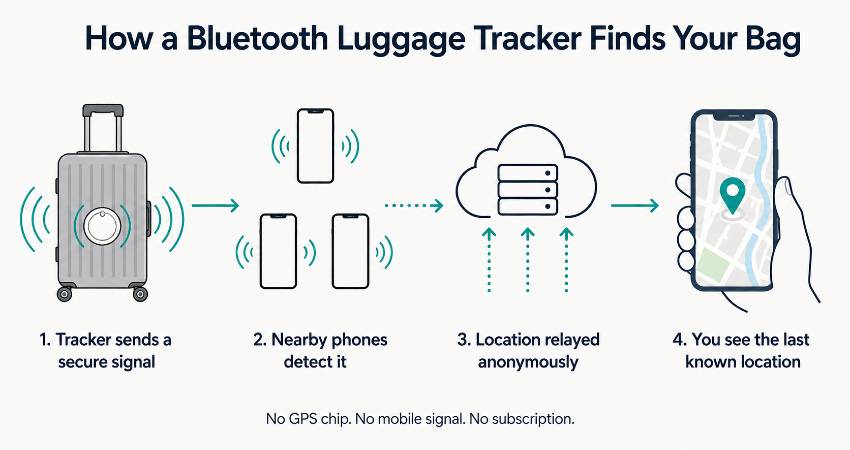
The important thing to remember is that an AirTag does not continuously transmit its position from anywhere in the world. Its wider-area location updates depend on other Apple devices detecting it.
If you use a Samsung Galaxy phone
The Galaxy SmartTag2 is the natural choice for Samsung owners. It uses Samsung’s SmartThings Find network and has features designed specifically around Galaxy devices.
It has a replaceable CR2032 battery rated for up to 500 days, Bluetooth connectivity of up to 120 metres under suitable conditions and an IP67 rating. Its built-in attachment point is also handy for luggage because you can secure it without buying an additional holder.
The trade-off is ecosystem lock-in. Its advantages make most sense when your household already uses compatible Samsung Galaxy devices. One timing note worth factoring in: a successor is reportedly due later in 2026, so if your next trip is months away rather than weeks, it may be worth waiting to see what Samsung announces before buying a multi-pack.
If you use a Google Pixel or another Android phone
Look for a tracker that works with Google’s Find Hub ecosystem rather than assuming every Android-compatible tracker behaves in the same way.
The Motorola Moto Tag is an especially relevant option for non-Samsung Android users, and the second-generation Moto Tag 2 reached the UK in 2026 with ultra-wideband precision finding and an IP68 rating. The crucial point is not simply that it works with Android; it is that it connects to Google’s wider finding network.
If your household uses both iPhone and Android
This is where the buying decision becomes more interesting. A cross-platform tracker such as a Pebblebee Clip or Card can be switched between Apple Find My and Google Find Hub.
However, switching networks is not the same as tracking on both networks simultaneously. A household that needs both people to monitor the same suitcase independently may be better served by two ecosystem-specific trackers.
Our Top Luggage Tracker Picks
Apple AirTag: Best for iPhone Users
For an iPhone owner, AirTag remains one of the easiest recommendations. Its biggest strength is not the tag itself but the reach of the Find My ecosystem around it.
That matters at airports. A suitcase moving through a busy terminal has far more opportunities to be detected by nearby compatible devices than a bag sitting alone in a remote field.
The current AirTag costs £29 for one or £99 for four from Apple in the UK. Its CR2032 battery is replaceable, and the compact disc-shaped design adds very little weight to a suitcase.
Its main inconvenience is physical attachment: the AirTag has no built-in keyring hole, so a luggage loop or case is required. In practice that is a minor cost, but it is one people routinely forget to budget for.
Samsung Galaxy SmartTag2: Best for Samsung Galaxy
SmartTag2 is particularly convincing for Galaxy owners who want a tracker that can be left in luggage for months without worrying about charging it.
Its replaceable battery, 500-day rated life, IP67 protection and built-in loop make it practical for frequent travel. UWB features on compatible Galaxy devices can also help with close-range finding — the difference between knowing your bag is somewhere in arrivals and knowing it is on the belt behind you.
Its weakness is simple: it is not the right universal Android tracker. The ecosystem matters, and Samsung owners get the strongest experience.
Motorola Moto Tag: Best for Other Android Phones
For Pixel, OnePlus, Motorola and similar Android users, a Google Find Hub-compatible tracker avoids the assumption that Samsung’s ecosystem is the default choice.
This category is particularly important because Android is not one giant tracking ecosystem. The network behind the tracker can matter more than the logo printed on the device. The newer Moto Tag 2 also brings ultra-wideband and tougher IP68 sealing, which is worth checking for if you tend to travel light and hard.
Pebblebee Clip or Card: Best for Mixed Ecosystems
Pebblebee’s advantage is flexibility. The Clip gives you a conventional luggage-friendly shape, while the Card works better when you want something thin.
Both can be paired with Apple Find My or Google Find Hub, although only one network can be active at a time. That makes them useful for families where travellers change between iPhone and Android, but less compelling than native options for a single-device ecosystem.
Tile: Best for Existing Tile or Life360 Users
Tile remains a sensible option for travellers who already use the Tile ecosystem or Life360. It also has the advantage of supporting both iOS and Android.
The important consideration is network density. A tracker can have impressive Bluetooth hardware yet still provide fewer public location updates if there are fewer compatible phones around it. If you are torn between the main options, our AirTag vs Tile vs Samsung SmartTag comparison looks at how the three networks differ once the marketing claims are stripped away.
Cellular GPS Tracker: Best for Remote or Specialised Travel
A cellular GPS tracker is a different category altogether. It can use GPS for positioning and a mobile network to send that information back to you, giving it an important advantage where Bluetooth crowdsourcing is less useful. That connectivity is also where the running costs come from, and it is worth understanding whether a GPS tracker needs its own SIM card before you compare prices between models.
The downside is size, charging requirements and usually a subscription. For an ordinary checked suitcase travelling between major airports, that can be unnecessary. For remote expeditions, valuable equipment or situations where more frequent location information genuinely matters, it can make sense.
Bluetooth vs GPS Luggage Trackers
| Feature | Bluetooth tracker | Cellular GPS tracker |
|---|---|---|
| How it gets a location | Nearby compatible phones | GPS plus cellular connectivity |
| Typical size | Small | Larger |
| Subscription | Usually none | Usually required |
| Airport use | Excellent in busy areas | Excellent, where supported |
| Remote areas | Can be limited | Potentially better |
| Real-time tracking | No | More frequent updates possible |
The simplest way to think about it is this: a Bluetooth tracker asks, “Has a nearby compatible phone seen me?” A cellular GPS tracker is designed to obtain its own position and communicate it over a mobile network.
For normal airline travel, the first option is often enough. Airports are crowded environments, and that is exactly where crowdsourced Bluetooth networks can be most useful.
How Luggage Trackers Work at the Airport
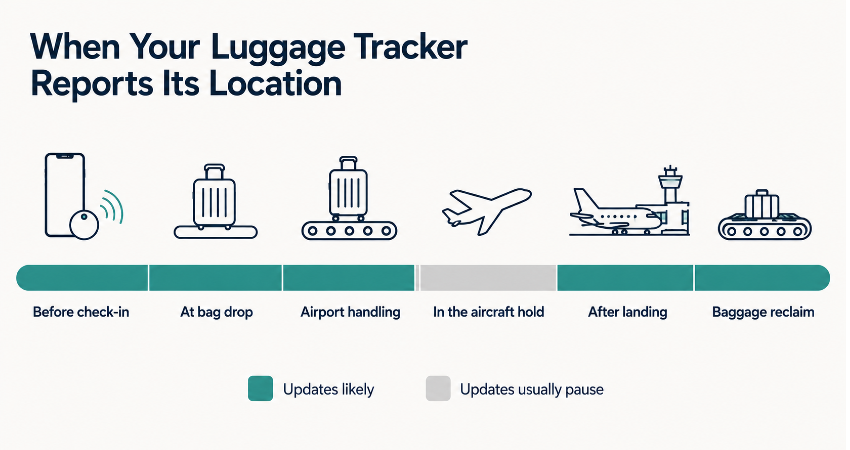
- Before check-in: Pair the tracker, give it a recognisable name and check that its location appears correctly.
- At bag drop: Place the tracker securely inside the suitcase.
- During airport handling: Nearby compatible phones can detect the tracker and relay an updated location.
- During the flight: Location updates may stop or remain at the last known point because the bag is no longer surrounded by the relevant devices.
- After landing: Updates can resume as the baggage moves through the airport.
- If the bag is misrouted: The last reported location can provide useful evidence of where it actually went.
This is why checking your tracker at a connecting airport can be genuinely useful. You may discover that your suitcase is still sitting at the departure airport before you board the next flight — which is unwelcome news, but far better to learn while you can still speak to someone about it.
Can You Put a Tracker in Checked Luggage?
Low-energy Bluetooth baggage trackers are treated differently from larger battery-powered devices. Current aviation guidance specifically allows qualifying Bluetooth baggage trackers to remain active in checked baggage when their small lithium cells stay within the applicable limits. The coin cells used in mainstream tags such as AirTag, SmartTag2 and Moto Tag sit comfortably inside those thresholds, which is why they are treated so differently from a power bank.
That does not mean every electronic tracker or smart-baggage product follows identical rules. Cellular GPS devices, smart luggage with integrated electronics and larger rechargeable batteries need more careful checking, and individual airlines can impose their own requirements. Spare loose batteries are a separate matter again and generally belong in your hand luggage rather than the hold.
Before flying, check the rules for your airline and the specific device rather than relying on a generic statement that “trackers are allowed”.
Where Should You Put a Tracker in Your Suitcase?
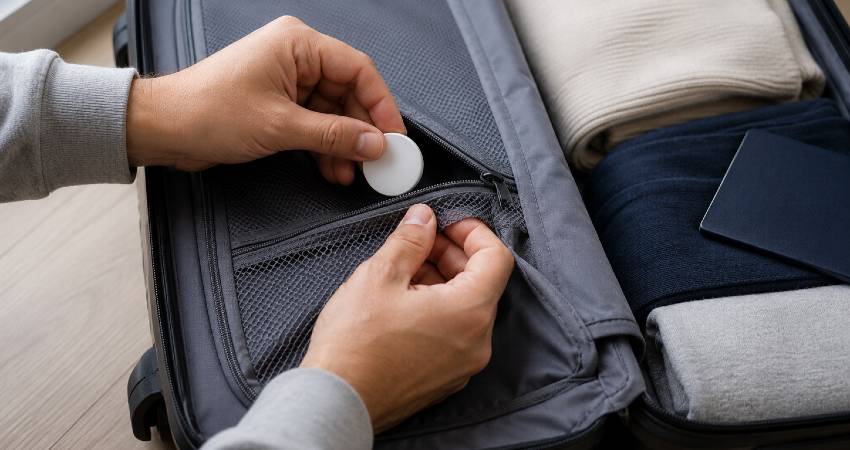
- Use an internal zipped pocket for protection and discretion.
- Secure it properly rather than letting it move freely around the suitcase.
- Use a suitable case or loop for devices without a built-in attachment point.
- Test the location before handing the suitcase over.
There is little benefit in hiding a tracker so deeply that you cannot easily reach it when the battery needs replacing. A protected internal pocket is usually a sensible compromise. It is also worth naming the tracker after the bag rather than the trip, so that “Large blue case” still makes sense two holidays later.
What to Do If Your Luggage Goes Missing
- Check the tracker for its most recent location.
- Compare that location with your route and baggage itinerary.
- Take a screenshot of the latest position.
- Tell the airline’s baggage team exactly where the tracker is reporting, and share the location link directly if your tracker supports it.
- Continue checking for new updates rather than assuming the first location is current.
That fourth step has become considerably more useful in recent years. Apple’s Share Item Location lets you generate a secure, temporary link to an AirTag or Find My accessory and hand it to a participating airline’s baggage team, and the list of carriers accepting it now includes British Airways, Virgin Atlantic, Aer Lingus, Iberia and dozens of others. Google introduced an equivalent feature in Find Hub during 2026, with the shared location feeding into the baggage-tracing systems airlines already use. In both cases the link expires automatically after seven days and can be revoked at any time, so you are not handing over open-ended access to your belongings.
A tracker is evidence, not a guarantee of recovery. It can tell you where the device was detected, but it cannot make an airline retrieve the suitcase immediately or identify every bag in a crowded baggage room. What it does do is replace “my bag is missing” with “my bag is in the transfer area at Terminal 2” — and that is a very different conversation to have at a service desk.
Common Luggage Tracker Mistakes and Misconceptions
“An AirTag is a GPS tracker.”
No. AirTag is a Bluetooth-based item tracker that relies on the Find My network for wider-area location updates.
“A 120-metre range means I can track my bag from 120 metres away.”
Not in the way most people imagine. Advertised Bluetooth range generally describes direct connectivity under favourable conditions. Network-based tracking is a different mechanism.
“My tracker should show my suitcase moving continuously.”
Bluetooth trackers do not provide a constant live feed. Updates depend on when the tracker is detected by compatible nearby devices.
“Any Android tracker will work with every Android phone.”
Android compatibility is not enough. Always check which finding network the tracker uses.
“GPS is always better.”
Not necessarily. GPS can offer advantages for remote tracking, but Bluetooth trackers are smaller, cheaper and usually subscription-free.
How Many Trackers Do You Need?
One tracker per checked suitcase is the simplest approach. Families travelling with several bags may choose to tag each important piece of luggage, particularly when the bags can become separated — and they do separate, often at exactly the connection where nobody is watching.
Two different trackers can also make sense in a mixed iPhone and Android household. One can use Apple Find My while the other uses a Google or Samsung ecosystem, giving both travellers an independent way to check the bag.
Are Luggage Trackers Safe and Private?
Modern tracker ecosystems include safeguards intended to reduce unwanted tracking. Phones can warn users about unknown compatible trackers travelling with them, while manufacturers provide ways to identify or disable suspicious devices.
For ordinary luggage use, the main practical point is to keep your phone and tracker software updated and take an unexpected unknown-tracker warning seriously. Those alerts exist for a reason, and dismissing them out of habit defeats the purpose.
Which Luggage Tracker Should You Buy?
For most travellers, the decision is simpler than the enormous number of products suggests.
- iPhone: Choose an Apple Find My tracker, with AirTag as the straightforward option.
- Samsung Galaxy: Choose Galaxy SmartTag2.
- Other Android: Choose a tracker designed for Google Find Hub.
- Mixed iPhone and Android: Consider a switchable Pebblebee tracker, or use two ecosystem-native trackers if both phones need simultaneous access.
- Remote or specialist travel: Consider a cellular GPS tracker where more frequent location updates justify the extra cost and subscription.
Frequently Asked Questions About Luggage Trackers
What is the best luggage tracker?
The best choice depends primarily on your phone. AirTag is a strong choice for iPhone users, SmartTag2 suits Samsung Galaxy owners, and Google Find Hub-compatible trackers are better suited to other Android phones.
What is the best luggage tracker in the UK?
For most UK travellers, an ecosystem-compatible Bluetooth tracker is the most practical option because it is small, inexpensive and generally does not require a monthly subscription.
Is an AirTag good for checked luggage?
Yes. It is particularly useful for confirming the last detected location of a suitcase and checking whether a bag appears to have reached the destination airport. It also lets you share that location securely with most major UK-serving airlines when you file a delayed baggage report.
Do luggage trackers work internationally?
They can, but performance depends on the tracking network and the availability of compatible devices around your luggage. Busy airports and cities are generally more favourable than remote areas.
Do luggage trackers work during a flight?
Do not expect continuous updates while your suitcase is inside an aircraft hold. The useful updates often come before departure and after the bag reaches another connected airport environment.
Can I track my suitcase without a subscription?
Yes. Popular Bluetooth trackers from Apple, Samsung and several competing brands typically provide their core finding functions without a monthly tracking subscription.
Where should I put a tracker in my suitcase?
An internal zipped pocket is usually a good choice. It protects the device while keeping it accessible and secure.
Final Verdict
The best luggage tracker is not necessarily the one with the longest advertised range or the most advanced specifications. It is the one whose network your phone can actually use when your suitcase disappears behind the baggage-handling system.
For most UK travellers, a small Bluetooth tracker is the sweet spot: inexpensive, lightweight and particularly useful in busy airports. Choose the tracker that matches your phone ecosystem first, then consider battery life, attachment, durability and subscription costs.
The most important takeaway is simple: choose the network before you choose the gadget. That single decision will have more impact on your luggage-tracking experience than most of the numbers printed on the box.