

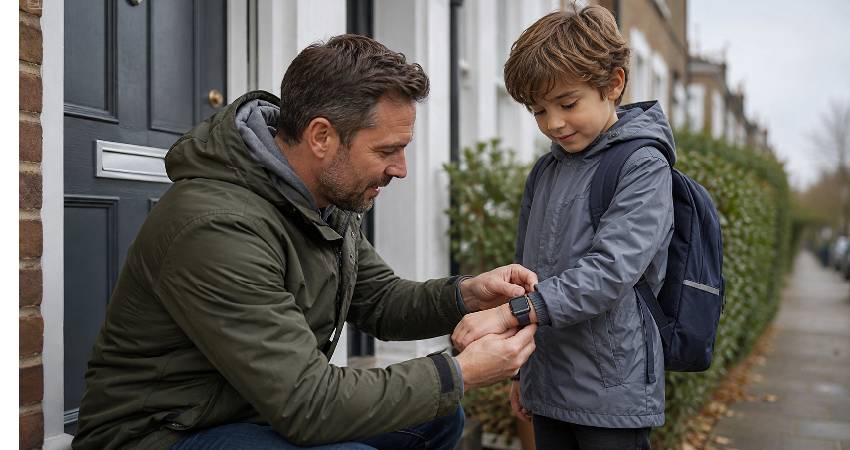
A GPS watch can give a child more freedom without giving them everything that comes with a smartphone. But there is an important catch: a location pin on a parent’s phone is only useful when the watch has the right connectivity, battery, controls and safety features.
For families considering a GPS watch for kids, the real question is not simply which model has the most features. It is whether the device will work reliably when your child is walking to school, visiting a friend, attending a club or spending time somewhere busy.
It also helps to understand where a children’s watch sits within the wider tracking category. Bluetooth tags, standalone cellular trackers and connected kids’ watches solve genuinely different problems, and comparison resources such as Tracqueur are useful for seeing how those categories differ before committing to one. That distinction matters more than most buying guides admit, because choosing the wrong type of device is the most common and most expensive mistake families make here.
What Is a GPS Watch for Kids?
A children’s GPS watch combines location tracking with communication features in a wearable designed for younger users. Depending on the model, a child may be able to call approved contacts, send messages, trigger an SOS alert and use a limited set of other functions.
The key difference from a basic tracker is communication. A tracker may mainly tell you where a device is, while a connected children’s watch can also let your child contact you. Compared with a normal smartwatch, it typically offers much tighter parental controls and fewer unrestricted apps.
Can a child use a GPS watch without a phone?
Yes, the child can usually use the watch without carrying a smartphone. The watch itself handles communication and location functions. However, parents will normally still need a phone and a companion app to manage contacts, settings and location information. In practice this means the watch is only ever as reliable as the parent’s own phone, account and notification settings — worth remembering if you routinely leave your phone on silent.
When Does a Child Actually Need a GPS Watch?
Age alone is a poor way to decide. A better test is readiness. A GPS watch becomes more useful when a child is beginning to spend time away from direct supervision.
- Walking part of the journey to school
- Going to friends’ homes independently
- Attending clubs or after-school activities
- Playing outdoors without a parent nearby
- Following simple rules about charging and wearing the device
A six-year-old who regularly attends activities with trusted adults may have less need for one than a nine-year-old who cycles to school. The watch should solve a real family need rather than become another screen simply because a child is old enough to wear it.
It is also worth being honest about what the watch is for. If the aim is reassurance on a fifteen-minute walk, a simple device usually does the job. If the aim is contact during a long day of independent travel, calling and battery life move up the list.
The Most Important Safety Features in a Kids GPS Watch
Real-time GPS tracking
GPS gives parents a way to check a child’s location, but “real-time” should not be interpreted as perfectly continuous, second-by-second tracking. Location updates depend on the watch, its software, battery settings and network connection.
A better question is how quickly and consistently the device updates its location in the places your child actually goes. Many watches also slow their update frequency to preserve battery, which is generally sensible — but it does mean the pin you are looking at may be a few minutes old rather than live.
Geofencing and safe zones
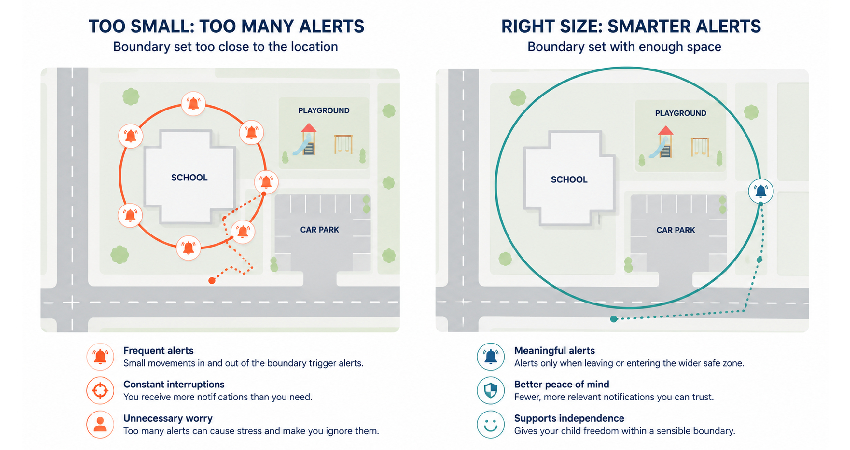
Geofencing lets you create a virtual boundary around places such as home, school or a sports centre. You can then receive an alert when the watch enters or leaves that area.
This can be more useful than repeatedly opening a tracking app. For example, an arrival alert can tell you that your child reached school without requiring you to check their location manually.
One practical note: very small zones tend to cause problems. A boundary drawn tightly around a single building can trigger repeated false alerts as the location drifts, so most families find larger, sensibly sized zones far more useful than precise ones.
SOS emergency button
An SOS button should be simple enough for a child to use under pressure. Depending on the watch, it may call selected contacts, send an alert or share the child’s location.
Do not assume SOS automatically contacts emergency services. Check exactly what happens after the button is pressed, then practise the process with your child. A two-minute test at the kitchen table tells you more than any product description — and it also shows you whether the alert actually reaches your phone when the app is closed.
Approved contacts and parental controls
Restricted calling and messaging can be a major advantage over giving a young child a full smartphone. Parents can control who the child communicates with instead of exposing them to open messaging, social media or unrestricted internet access.
What is worth noting here is that this restriction is the point, not a limitation. For most families buying a first device, the shorter feature list is the reason the watch works.
How Accurate Are GPS Watches for Children?
GPS works best when the watch has a clear view of the sky. Accuracy can be affected by buildings, dense urban areas, trees and other obstacles. Indoors, the watch may rely more heavily on other positioning methods.
That means an occasional location that appears slightly away from where your child actually is does not necessarily indicate a faulty device. What matters is consistent performance and sensible location updates.
Indoors, in a shopping centre or a large school building, positioning often falls back on Wi-Fi or mobile masts, which can place the watch a street or two away from its true position. Generally speaking, a location that is consistently in roughly the right area is doing its job.
GPS, Wi-Fi and mobile networks: what is the difference?
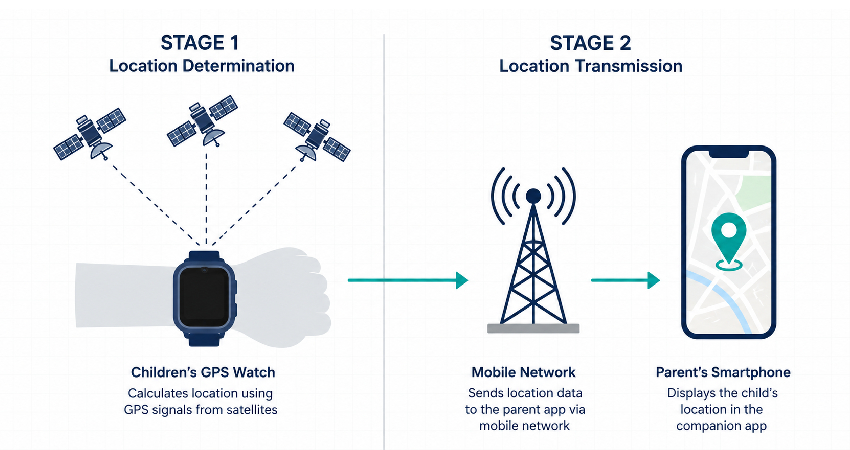
GPS helps determine position. Wi-Fi and mobile networks can assist with positioning or help transmit location data back to the parent app. Cellular connectivity is particularly important because calculating a location and sending that location to you are two different jobs.
The network generation matters too, and this is where a lot of cheaper watches quietly fall down. UK 3G services have now been switched off, and mobile operators have committed to retiring 2G by 2033 at the latest, with several starting much sooner. Plenty of budget children’s watches still ship with 2G-only connectivity, which means a device bought today may lose its connection long before your child outgrows it. Confirming 4G/LTE support is no longer a premium consideration — it is basic future-proofing.
Do Kids GPS Watches Need a SIM or Monthly Subscription?
Many connected watches depend on mobile service. Some include a provider-managed plan, while others use a SIM arrangement. Before buying a kids GPS watch UK families should check the network, coverage and ongoing service costs. If you are unsure how that side of things works, it is worth understanding whether a GPS tracker needs a SIM card before comparing models, because it changes which watches are realistic options.
| Cost to check | Why it matters |
|---|---|
| Watch price | The initial purchase cost |
| SIM or mobile service | May be required for calling and tracking |
| Subscription | Some features depend on an ongoing plan |
| Accessories | Straps, chargers or replacements may add to the total |
A low-cost watch is not necessarily cheaper over two years. Compare the total cost of ownership, not just the price on the box.
It is also worth asking what happens if the subscription lapses. On some devices the watch keeps working as a basic timepiece while tracking and calling stop, which is a very different outcome from one that simply becomes unusable.
School Mode, Battery and Durability
School Mode or quiet hours can reduce games and notifications while allowing important functions to remain available. However, always check the school’s own rules before sending a connected watch into class. Many schools now treat a device that can call and message exactly as they treat a phone, regardless of whether it is worn on the wrist.
Battery life also matters more here than it might on an ordinary smartwatch. A dead watch cannot reliably provide connected safety features. If you have ever watched your own phone hit 1% at the worst possible moment, you already understand the problem — the difference is that here, it is the device you are relying on to reach your child. Charging overnight and teaching your child what a low-battery warning means prevents most of these situations before they start.
Durability matters too. Check water resistance, strap quality and screen protection according to how your child actually uses the watch. “Waterproof” should never be treated as a guarantee that every model is suitable for swimming; many ratings cover splashes and rain rather than submersion.
GPS Watch vs Smartphone vs Basic Tracker
| Option | Best suited to | Main advantage |
|---|---|---|
| GPS watch | Children gaining independence | Tracking plus controlled communication |
| Basic GPS tracker | Location-focused needs | Simpler, fewer distractions |
| Smartphone | Older or more independent children | Much broader communication and app access |
A GPS watch is not automatically the safest choice. For some families, fewer features are an advantage. For others, calling and location tracking in one device may be exactly what they need.
Bluetooth tags belong in a separate category again. They rely on nearby phones rather than their own connection, so while comparisons such as AirTag, Tile and Samsung SmartTag are genuinely useful for bags and belongings, they are not designed to keep track of a child.
Privacy and Responsible Tracking
Location tracking protects children, but it also creates sensitive data. Parents should understand who can access the child’s location, how accounts are secured and what information the provider stores.
Use a strong, unique password for the parent account and enable multi-factor authentication where available. More importantly, make tracking part of a clear safety agreement rather than a reason to monitor every movement. Children who understand why the watch exists tend to wear it and charge it; children who feel watched tend to leave it in a bag.
The aim is to create a safety net that supports independence, not to remove the child’s sense of freedom.
How to Choose the Right GPS Watch for Your Child
- Define the main need: location, calling, school journeys or emergency contact.
- Check connectivity: confirm 4G/LTE, SIM requirements and UK network compatibility.
- Examine parental controls: look for approved contacts, geofencing and School Mode.
- Test SOS: understand exactly who is contacted and what information is sent.
- Check battery and durability: choose a device your child can realistically wear and maintain.
- Calculate the full cost: include subscriptions and mobile service.
- Review privacy: check account security and location-data practices.
Common GPS Watch Mistakes to Avoid
- Assuming GPS location is always exact
- Treating “real-time” as second-by-second tracking
- Assuming an SOS button automatically calls emergency services
- Buying a 2G-only watch without checking how long that network will be supported
- Buying based only on the watch’s upfront price
- Assuming every water-resistant model is suitable for swimming
- Choosing a feature-heavy watch when a simpler device would be more suitable
- Ignoring school rules or the child’s ability to manage the device
FAQs About GPS Watches for Kids
Can a GPS watch work without a mobile signal?
The watch may still be able to determine its position, but sending that information to a parent may depend on cellular or another available connection. In areas with patchy coverage, the app often catches up once the watch reconnects.
Do all kids GPS watches have monthly fees?
No. Costs vary by model and service arrangement, so check whether tracking, calls and messaging depend on an ongoing subscription or SIM.
What age is suitable for a GPS watch?
There is no universal age. Independence, maturity, daily routines and the family’s safety needs are more useful measures than age alone.
Can parents track a child’s location all the time?
Some connected watches support frequent location updates, but technical limits still apply. Responsible use also means avoiding unnecessary monitoring.
What happens if the battery dies?
Connected safety functions may become unavailable. A regular charging routine is therefore part of using the watch safely.
Final Thoughts
The best GPS watches for kids are not the ones with the longest feature list. They are the ones that reliably solve a specific family problem without introducing unnecessary distractions.
Prioritise dependable location tracking, safe communication, SOS, sensible parental controls, suitable connectivity and a realistic total cost. Then consider the less obvious details: battery habits, school rules, privacy and how much independence your child is genuinely ready for.
If there is one thing worth being firm about, it is connectivity. Features can be lived without; a watch that cannot reach the network is just a watch.
Used well, a GPS watch should feel less like a miniature smartphone and more like a safety bridge between supervision and independence. That is the standard worth buying for.